Read the session and closed-trade record
Use the four Logbook views to read session events, closed trades, original screen observations and recorded results with their own scope.
2 chapters · 6 steps Open guideA clear way into the workstation
Start with an account, build your workspace, prepare deliberately and keep the record. Follow practical instructions for the controls in front of you.
The guides below are the product manual. An optional published introduction can add context; it does not replace the search, instructions or account help.
01 / Find your next task
Each guide includes preparation, ordered steps, checks and the limits that matter.
Use the four Logbook views to read session events, closed trades, original screen observations and recorded results with their own scope.
2 chapters · 6 steps Open guideOpen the private per-trade review to separate what you requested, what the app observed and the available fill evidence. Practice reports identify their simulated execution policy.
2 chapters · 8 steps Reading nowReview the work actually saved on your computer, with its original account and source identity. Offline review is a separate local reading workspace.
2 chapters · 6 steps Open guide02 / Review & save
Open the private per-trade review to separate what you requested, what the app observed and the available fill evidence. Practice reports identify their simulated execution policy.
A closer look
Watch the labelled visual guide, then inspect the captured controls. Select a numbered note to understand the pictured control, or enlarge the capture to inspect its details.
Silent guide. Use Play when ready, or read the transcript. Chapter buttons seek without starting playback.
This is NukBord’s actual Execution Review with synthetic Practice inputs. The sample request, fill and dispatch quote are fictional.
The requested quantity is 0.50. The recorded fill is 0.50 at an average price of 1.08425. An accepted application response alone does not prove a fill.
This buy compares its fill with the retained matching-feed dispatch ask of 1.08422. At the retained 0.00001 increment, the difference is three adverse ticks, not pips or an extra ledger charge.
The 36.0 ms pairs locally recorded application dispatch and response observations. It includes application transport and response handling; it does not isolate broker processing or network delay.
The monetary estimate is unavailable because original instrument and conversion evidence is missing. No cash amount can be inferred from this gap.
The desktop report does not compute pending-order comparisons. The website’s separate Limit example is a request-price illustration. Explore the Market example, then check platform requirements.
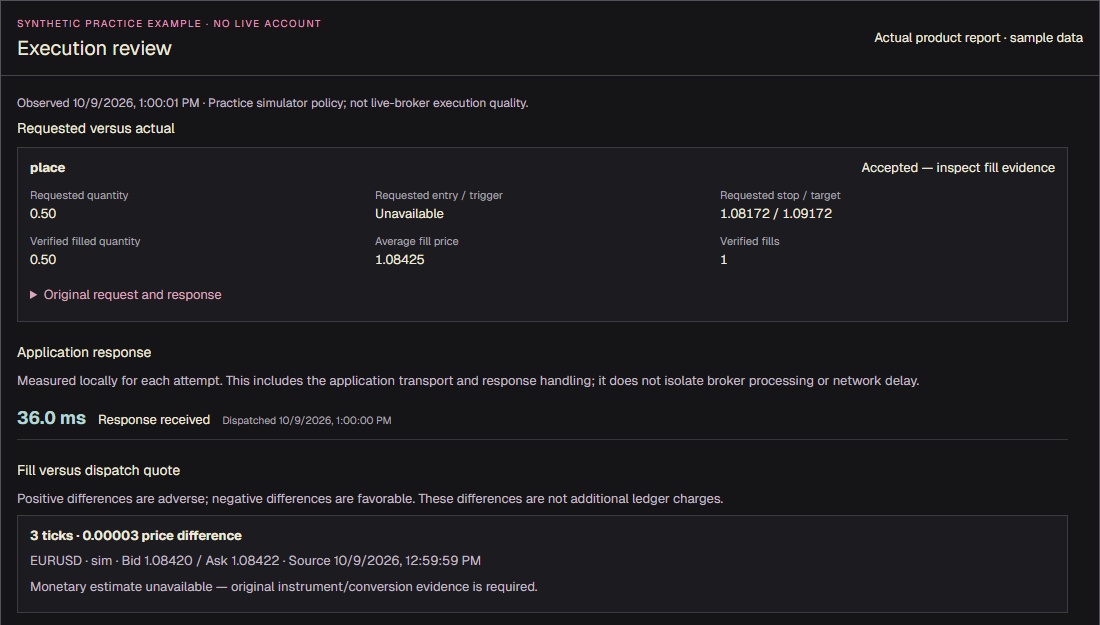
This Practice example requests 0.50 and records 0.50 filled at an average price of 1.08425. Read the source evidence as well as the quantities. An accepted application response alone does not prove a fill. Original request and response opens the retained fields in the workstation.
Current Execution Review with synthetic Practice data. The sample request, fill and dispatch quote are fictional; no account or broker is connected.
Product screenshot with sample data. Pictured controls are not live.
Select a numbered marker. Arrow keys move through notes.
Open it from a Logbook trade, position details or the Entry Pad where available. The report belongs to the selected account and trade.
Requested versus actual keeps requested quantity and protection separate from verified filled quantity and average fill price. Acceptance alone does not prove a fill. Expand Original request and response to inspect the retained fields.
Select a recorded Event timeline observation to read its evidence and time basis. Keep local application clocks, source timestamps and fill evidence distinct; inspect receipt identities and raw fields when needed.
Recorded costs and protection observations are separate parts of the report. Read Evidence coverage for gaps in retained observations. Missing commission, swap or fees are unavailable, never an assumed zero.
You can trace a displayed fact to its original request, observation or verified fill.
A market-order comparison needs one attributable attempt and a retained dispatch quote from the matching feed. If that quote is missing or ambiguous, slippage stays unavailable.
The report compares the volume-weighted fill to the dispatch ask for a buy or bid for a sell. Positive slippage is adverse; negative slippage is favourable. Ticks use the retained price increment; do not read them as pips. A monetary estimate needs its original instrument and conversion basis and is not an extra ledger charge.
The current report does not use pending-order placement quotes as fill-time benchmarks. Original requested prices and available fills remain readable. The website’s Limit improvement illustration teaches a separate request-price calculation, not a computed comparison in this desktop report.
The displayed duration pairs locally recorded dispatch and response observations. It includes application transport and response handling; it does not isolate broker latency or network latency.
You know the baseline, direction and evidence limits of the comparison, rather than treating unavailable slippage as zero.
03 / Keep the definition handy
3 of 10 public references. The capability descriptions remain separate from the step-by-step guides.
A per-trade report separating your request, verified fills, slippage where evidence allows, recorded costs and missing observations.
An execution review answers a simple question about one trade: what did I ask for, and what actually happened? The report keeps the original request, the application's observations, and the available fill evidence in separate sections. Practice reports identify their simulated execution policy.
For a market order with one attributable attempt and a retained quote from the same feed, the report compares the volume-weighted fill with the dispatch ask for a buy or bid for a sell. Positive slippage is adverse; negative is favorable. Pending-order placement quotes are not treated as fill-time benchmarks, and missing or ambiguous quote evidence stays unavailable.
Costs appear only where they were recorded, and anything that was never observed is listed as missing evidence. Reviews are private to your account and can be reopened from your saved work.
Read the Execution review guideThe Day, The Log, Calendar & Results and journal notes keep a record of what you did and how it turned out.
The Logbook is the record of your trading. The Day lists what happened in the session, The Log keeps closed trades with your notes, and Calendar & Results shows your recorded results by day, as graphs, and compared between periods.
Results are calculated from the trades that were actually recorded, and the basis of each calculation is stated. Where history is missing, the Logbook says so instead of filling the gap.
Read the Logbook guideSaved layouts, charts, drawings, journal and recordings reopen without a connection, and backups are verified before they restore.
Your saved workspace is kept on your computer, separated by account owner. When you are offline you can still open it to review charts, drawings, notes and recorded sessions.
Backups are versioned, and a restore is verified before it replaces what you have. Offline review is for looking back; placing trades always needs the live, signed-in connection.
Read the Offline review guide04 / Account and help
Sign-in, access, billing and account tools. These answers stay available independently of the workstation filters.
Use normal Sign in with your NukBord email. Completing an emailed code or sign-in link takes you to Account. The same email is used for the website and Windows app. Signing out here ends this browser’s session; it does not sign out your Windows app.
Open your accountSubscription shows recorded access and subscription billing separately. A billing problem can need review even when access is recorded. Refresh account requests a new read; it does not make a payment or force an update. After a change in Manage billing, the membership record follows the received billing update, so it may not change immediately.
Review SubscriptionUnavailable means a field could not be established, not that its value is zero. Invoice search, filters and CSV cover matching loaded records. Currency totals include only matching loaded paid invoices and stay separate. You can explicitly read more history when available. These counts and totals are not a lifetime payment balance; missing amounts and source dates stay marked as missing.
Open Billing & invoicesRead your saved display name before saving an edit. This profile name is shared by the website and Windows app; it does not change your sign-in email or billing details. If the saved name changes elsewhere, or a save is unconfirmed, reread it and choose whether to keep your edit or use the saved name. Typing alone saves nothing.
Open Account & securityThe Download page checks whether a member release is published and whether your account currently has access. A published release alone does not confirm your eligibility. Open Download for the current result, including an unavailable release or account read; the account preview is not download authorization.
Check Download availabilityIn your account’s Support section, choose Save on this device to keep a browser copy for this account. Saved copies are reviewed and restored explicitly; changes are not saved automatically. Changing account sections keeps the draft open, but leaving, reloading or unavailable account verification can clear unsaved changes. If storage cannot save, copy or download your draft instead. Review an older saved copy before replacing it.
Review your Support draftNo. Prepare report creates a preview from your entered fields. Copying or downloading also sends nothing to Support. You decide when and how to share the report. If an email contact is available, the email link opens a draft with a subject; it does not send the report. Leave passwords, sign-in codes and card details out of it.
Open the report composerAccount & security includes theme, sound and motion controls for this browser’s website preferences. They do not change Windows app settings or sync those preferences with your account. The full Preferences page offers the rest of the website controls.
Open website PreferencesAdministrators use the same normal sign-in and land on Account. The Admin shortcut in the bottom-right strip is available only when the administrator role is verified. Opening the admin console still checks that role; an ordinary account or a local design preview does not gain administrator access.
Open Account & securityMembership
Read membership details and the actual available purchase terms.
Open Membership →Account
View your membership, invoices and account details after normal sign-in.
Open your desk →Support
Prepare a report in your own words and find the available contact.
Open Support →