01 / 03Coming soon
Monthly
$400
Per month · USD
One month at a time
$400 / month equivalent
Proposed monthly rate
BordRoom member access · coming soon
NukBord / Pricing
One payment buys the NukBord workstation for Windows, with lifetime desktop access on your NukBord account. No subscription and no renewal.
NukBord desktop / Windows
The NukBord workstation for Windows: charts, the Entry Pad, Tickers, the Screener, the Logbook and every other tool in the Windows download, with lifetime desktop access on your NukBord account. No subscription.
One time · USD
$2,000once
The one-time price. Purchases open soon.
The one-time purchase opens soon. No payment can start from this page yet.
BordRoom member access, the trader network, is separate and coming soon. Buying NukBord desktop does not include it.
BordRoom member access / USD · Coming soon
Not available for purchase yet.
The trader network: rooms, guilds, crews and voice. The member prices stay as listed. What is BordRoom? →
01 / 03Coming soon
$400
Per month · USD
One month at a time
$400 / month equivalent
Proposed monthly rate
BordRoom member access · coming soon
02 / 03Coming soon
$2,000
One upfront payment · USD
1 year / 12 months
≈ $166.67 / month equivalent
Comparison only · paid upfront
BordRoom member access · coming soon
03 / 03Coming soon
$10,000
One upfront payment · USD
10 years / 120 months
≈ $83.33 / month equivalent
Comparison only · paid upfront
BordRoom member access · coming soon
One year is the initial comparison choice. Choose any term to explore it; this selection does not reserve an offer, change your subscription or choose the price used at Checkout.
Your comparison choice
One upfront payment for a fixed year of access. The equivalent monthly amount is a comparison, not twelve installment payments.
Comparing the one year proposal.
The baseline assumes 12 payments at the unchanged proposed $400 monthly rate for the same duration. Rounded monthly equivalents divide the upfront amount by its access months; they are not installment offers or a prediction of future pricing.
One payment. Access starts when payment succeeds and ends after the purchased term, with no automatic renewal. Refund, tax and remaining purchase terms must be finalized before these offers open for live purchase. Current purchase availability is shown separately; a configured test checkout takes no real payment.
A per-trade report separating your request, verified fills, slippage where evidence allows, recorded costs and missing observations.
BordRoom member access · Coming soon
Current member priceComing soon
From $400 a month.
BordRoom member access opens later at its listed member terms. No subscription can start yet.
Tested on practice accounts and recorded data. The local MetaTrader 5 connection is not yet qualified for customer use.
The Windows app is not published yet. Owners get the download on their account page when it is.
BordRoom member access is not open for purchase. Existing members keep their access, billing and portal; the Buy key above sells only NukBord desktop.
BordRoom member access opens later at the price shown. No subscription starts here and nothing is charged.
Everything in NukBord desktop
9 included tools, plus Strategies coming soon. Inspect the controls here, then open the exact demonstration or Manual.
Per-trade report
A per-trade report separating your request, verified fills, slippage where evidence allows, recorded costs and missing observations.
Carry this tool and example into your comparison, Account and buying questions. Browsing other tools leaves that choice in place. This does not select a checkout or change an existing request.
The website example uses simulated data. These controls do not operate an account or place an order.
The screenshot shows the desktop Market review. Its synthetic fill is compared with the retained dispatch ask. The silent guide follows the same Market capture.
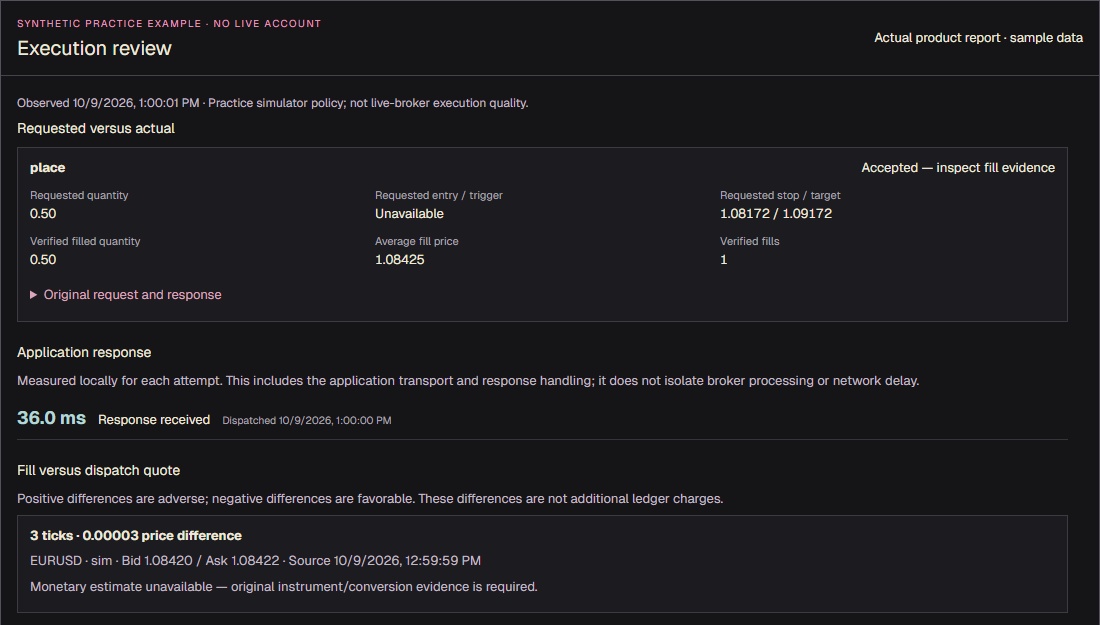
This Practice example requests 0.50 and records 0.50 filled at an average price of 1.08425. Read the source evidence as well as the quantities. An accepted application response alone does not prove a fill. Original request and response opens the retained fields in the workstation.
Current Execution Review with synthetic Practice data. The sample request, fill and dispatch quote are fictional; no account or broker is connected.
Product screenshot with sample data. Pictured controls are not live.
Select a numbered marker. Arrow keys move through notes.
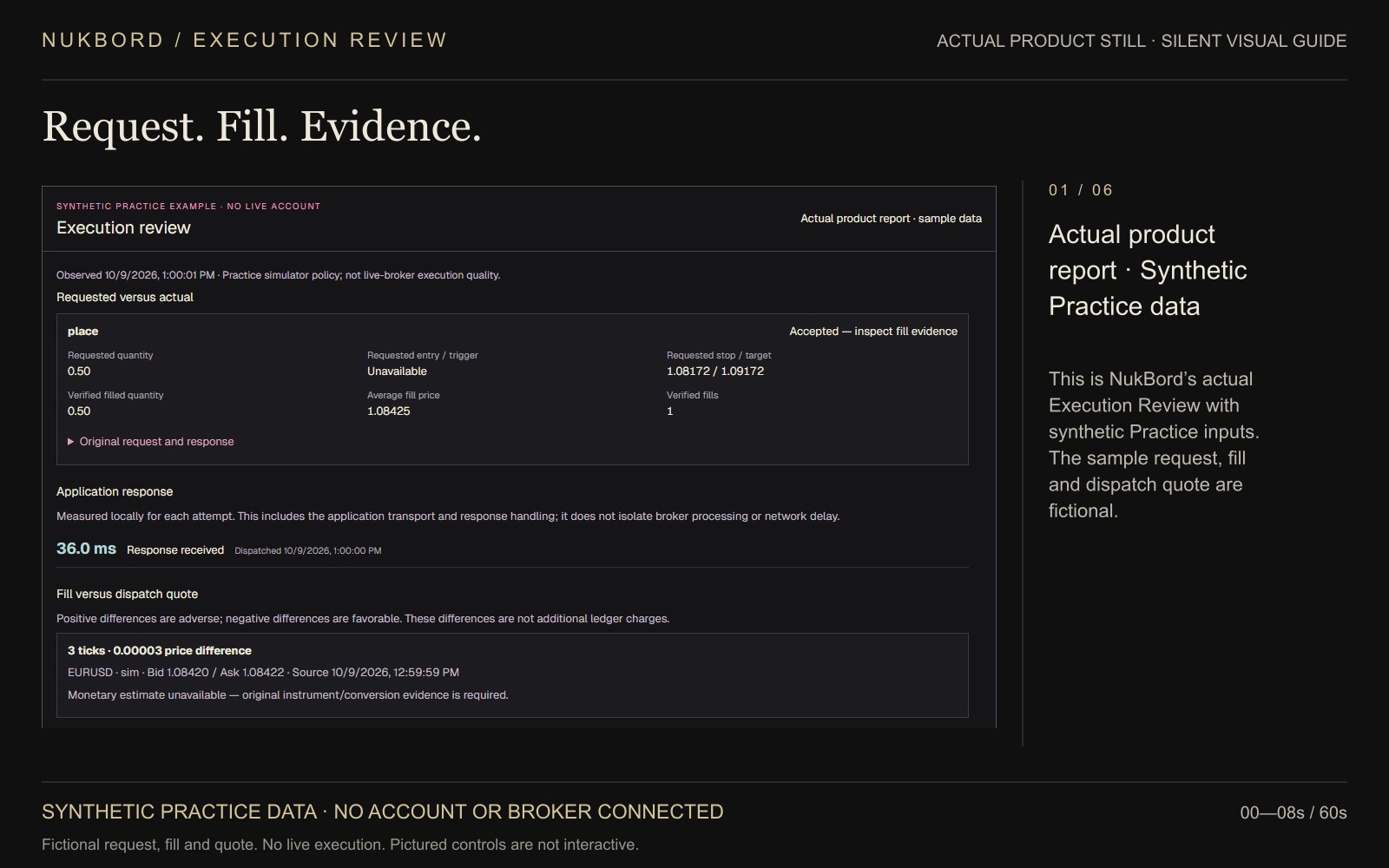
Product guide · 1:00 · Edition 2026-10-09
Silent annotated guide made from an actual product still, not a screen recording. Synthetic Practice inputs; no account or broker connected and no live execution.
Your account. Your workspace.
New accounts are not open yet. If you already have an account, sign in with your email and the 6-digit code we send. No password to remember.
Review the one-time price on Pricing and continue to secure checkout. One payment, no renewal. Stripe handles payment; we never see or store your full card number. Your license and receipt appear on your account page.
The Windows app is not published yet. When it is, the download appears on your account page, and you sign in to it with the same email and an emailed code.
The important details
A local MetaTrader 5 connection needs a 64-bit Windows 10 or 11 PC and your own MetaTrader 5 terminal from your broker, installed and signed in on the same PC. The NukBord download brings its own Python bridge, so there is nothing else to install. That connection has not yet been qualified for customer use.
Trailing stops, stop-to-entry and partial targets are run by the app, and only while it is open, signed in and connected. When the app is closed, only the stop-loss and take-profit held by your broker remain.
NukBord is trading software, not a broker. Browser demonstrations use simulated data. Buying NukBord desktop does not create a broker account or promise an exchange-data entitlement.
Before you decide
The one-time purchase, billing, access and what you can try before you buy.
No. The browser tour uses simulated chart data and an illustrative draft. It sends no orders, makes no broker connection and does not create an account or subscription.
The tour's draft and kept note stay in that page only; refreshing clears them.
Try the simulated tour · new tab ↗NukBord desktop is sold for one payment. Pricing shows the one-time price; once its Stripe price is configured, the amount there is read from Stripe, and Stripe Checkout shows the final total before you pay. There is no subscription and nothing renews.
Lifetime desktop access means the license recorded on your NukBord account does not expire and is not billed again. It covers the NukBord desktop app and its public workstation features for that account; connector qualification is a separate question. It does not include BordRoom member access, which is coming soon and sold separately, or any broker, market-data or MetaTrader 5 account.
Refund requests go through Support and the billing terms. When a purchase is fully refunded, or a card dispute is decided against the payment, the lifetime license ends.
The Buy key on Pricing shows whether purchases are open now. Live purchases open with the published Windows release.
Read the one-time purchase terms · new tab ↗NukBord desktop is a one-time purchase and never renews. This answer is for existing members: the following applies to the currently configured recurring membership. The one-year and ten-year offers are upfront fixed terms: access starts when payment succeeds and ends after the purchased term, with no automatic renewal. Those offers remain unavailable for purchase while refund, tax and remaining purchase terms are finalized.
The membership renews automatically each billing period until you cancel.
Manage your card, download invoices and cancel at any time from your account page, through Stripe's secure billing portal.
If you cancel, the membership stays active until the end of the period you have paid for.
Open your account →Stripe handles payment checkout and the billing portal. NukBord does not see or store your full card number. Billing records can include limited payment-method details and invoice information.
Availability and the final checkout details are shown on the Pricing page.
Read billing policy review · new tab ↗The Windows app is not published yet. Owners get the download on their account page when it is.
Your signed-in account checks eligibility before showing the download action. A published download does not by itself qualify a customer MT5 connection.
Check download availability · new tab ↗One payment, lifetime desktop access. The current price and your account determine the next step.