01 / 03
Monthly
$400
Per month · USD
One month at a time
$400 / month equivalent
Proposed monthly rate
Same 10 public workstation tools
NukBord / Pricing & membership
One membership for the NukBord workstation on Windows. It covers the app's features listed below, for as long as the membership is active.
Three proposed terms / USD
One public workstation feature set. Three ways to consider your time at the desk.
01 / 03
$400
Per month · USD
One month at a time
$400 / month equivalent
Proposed monthly rate
Same 10 public workstation tools
02 / 03Comparing
$2,000
One upfront payment · USD
1 year / 12 months
≈ $166.67 / month equivalent
Comparison only · paid upfront
Same 10 public workstation tools
03 / 03
$10,000
One upfront payment · USD
10 years / 120 months
≈ $83.33 / month equivalent
Comparison only · paid upfront
Same 10 public workstation tools
Your comparison has been restored. Choose any term to explore it; this selection does not reserve an offer, change your subscription or choose the price used at Checkout.
Your comparison choice
One upfront payment for a fixed year of access. The equivalent monthly amount is a comparison, not twelve installment payments.
Comparing the one year proposal.
The baseline assumes 12 payments at the unchanged proposed $400 monthly rate for the same duration. Rounded monthly equivalents divide the upfront amount by its access months; they are not installment offers or a prediction of future pricing.
One payment. Access starts when payment succeeds and ends after the purchased term, with no automatic renewal. Refund, tax and remaining purchase terms must be finalized before these offers open for live purchase. Current purchase availability is shown separately; a configured test checkout takes no real payment.
A full-width table of instruments that you filter by value, sort, and save as screens.
Review current availability
Current billing configurationMembership pricing is not published yet.
Explore the workstation and check its requirements while membership purchasing is unavailable.
Tested on practice accounts and recorded data. The local MetaTrader 5 connection is not yet qualified for customer use.
The Windows app is not published yet. Members get the download on their account page when it is.
The proposed terms above are not open for purchase. Any checkout available here uses only the configured recurring offer shown in this section; comparing a term does not select a checkout price.
Purchases open once pricing is published.
A connected set of tools
10 included tools. Inspect the controls here, then open the exact demonstration or Manual.
Instrument table
A full-width table of instruments that you filter by value, sort, and save as screens.
Carry this tool and example into your comparison, Account and buying questions. Browsing other tools leaves that choice in place. This does not select a checkout or change an existing request.
The website example uses simulated data. These controls do not operate an account or place an order.
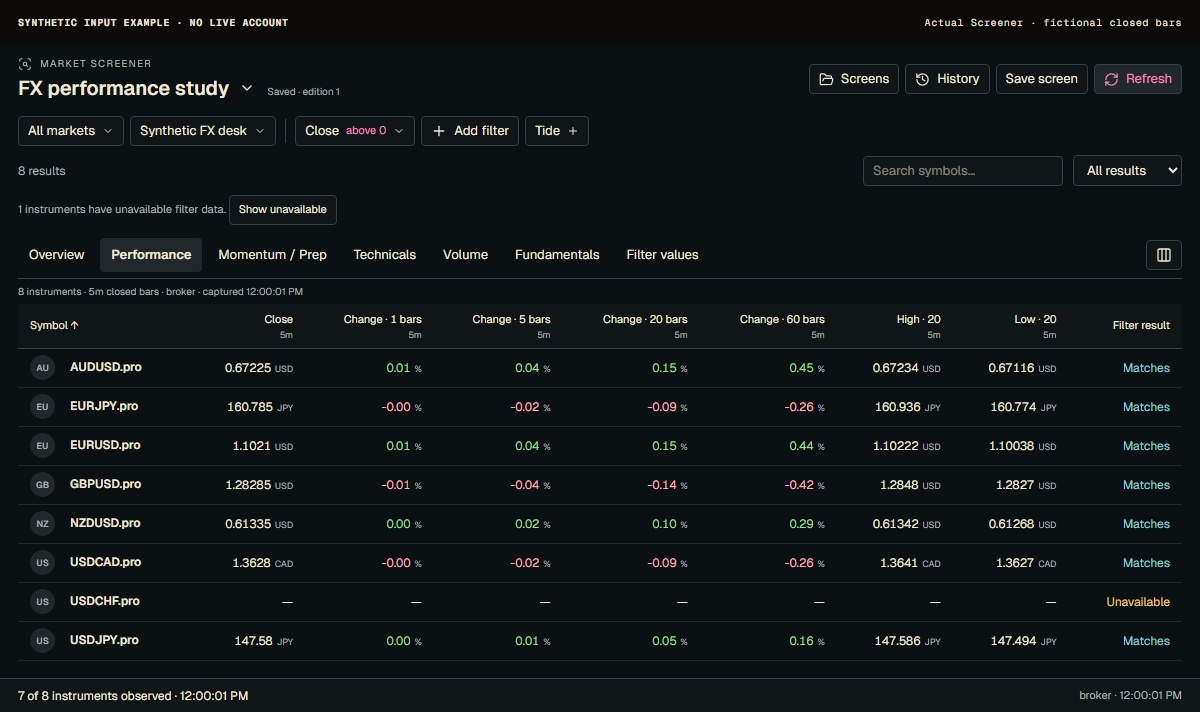
All markets and Synthetic FX desk define the pictured universe. Choose a market or an account list before filtering. The table keeps complete instrument names, including the .pro suffix in these fictional symbols; a similar name on another source is not interchangeable.
Current Screener with synthetic five-minute inputs and a fictional saved screen. Seven instruments have observations; one has unavailable data. No live account or market provider is connected.
Product screenshot with sample data. Pictured controls are not live.
Select a numbered marker. Arrow keys move through notes.
Your account. Your workspace.
New accounts are not open yet. If you already have an account, sign in with your email and the 6-digit code we send. No password to remember.
Review the current membership price, billing period and availability. If checkout is available to your account, continue to secure checkout. Stripe handles payment; we never see or store your full card number.
The Windows app is not published yet. When it is, the download appears on your account page, and you sign in to it with the same email and an emailed code.
The important details
A local MetaTrader 5 connection needs MetaTrader 5, Python 3.11 and the MetaTrader5 package installed on the same PC. NukBord does not install them, and that connection has not yet been qualified for customer use.
Trailing stops, stop-to-entry and partial targets are run by the app, and only while it is open, signed in and connected. When the app is closed, only the stop-loss and take-profit held by your broker remain.
NukBord is trading software, not a broker. Browser demonstrations use simulated data. Membership does not create a broker account or promise an exchange-data entitlement.
Before you decide
Billing, access and what you can try before becoming a member.
No. The browser tour uses simulated chart data and an illustrative draft. It sends no orders, makes no broker connection and does not create an account or subscription.
The tour's draft and kept note stay in that page only; refreshing clears them.
Try the simulated tour · new tab ↗The following applies to the currently configured recurring membership. The one-year and ten-year offers are upfront fixed terms: access starts when payment succeeds and ends after the purchased term, with no automatic renewal. Those offers remain unavailable for purchase while refund, tax and remaining purchase terms are finalized.
The membership renews automatically each billing period until you cancel.
Manage your card, download invoices and cancel at any time from your account page, through Stripe's secure billing portal.
If you cancel, the membership stays active until the end of the period you have paid for.
Open your account →Stripe handles payment checkout and the billing portal. NukBord does not see or store your full card number. Billing records can include limited payment-method details and invoice information.
Availability and the final checkout details are shown on the Pricing page.
Read billing policy review · new tab ↗The Windows app is not published yet. Members get the download on their account page when it is.
Your signed-in account checks eligibility before showing the download action. A published download does not by itself qualify a customer MT5 connection.
Check download availability · new tab ↗The current price, availability and your account determine the next step.