A full-width table of instruments that you filter by value, sort, and save as screens.
Tested on practice accounts and recorded data. The local MetaTrader 5 connection is not yet qualified for customer use.
See the interaction
Explore Screener.
Every demo on this page runs in your browser on simulated data. Nothing in them is sent anywhere.
Share this demo
A public link to this simulated example. Your demo edits, search and account details are not included.
The behavior, explained
How it works.
The Screener lays your instruments out in one wide table. Choose a market or a list, set value filters, pick a column preset, and sort to find what you want to look at next.
It filters by the values you set. It does not produce trade recommendations, and running a screen never places an order.
See the workstation
Screenshots & clips.
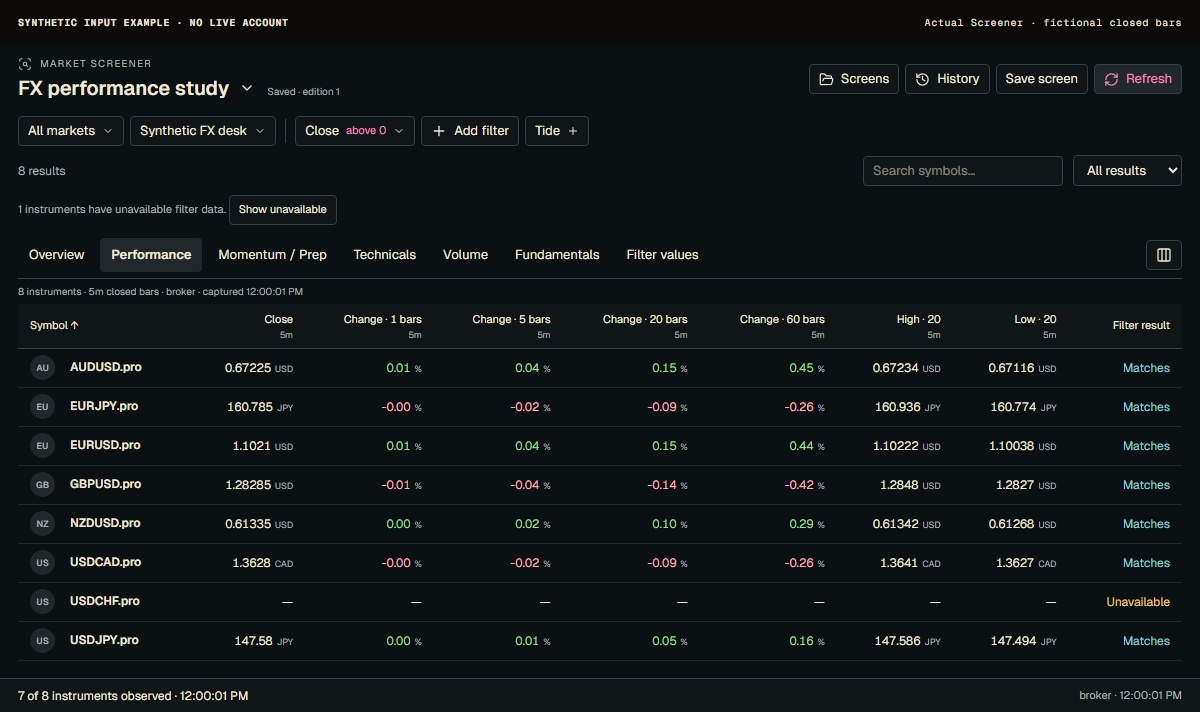
All markets and Synthetic FX desk define the pictured universe. Choose a market or an account list before filtering. The table keeps complete instrument names, including the .pro suffix in these fictional symbols; a similar name on another source is not interchangeable.
Current Screener with synthetic five-minute inputs and a fictional saved screen. Seven instruments have observations; one has unavailable data. No live account or market provider is connected.
Product screenshot with sample data. Pictured controls are not live.
Select a numbered marker. Arrow keys move through notes.
Example data in screenshots and clips is simulated.